
Powers & Spells
Every power and spell in the Book of Shadows, group by group. Use On this page to jump to a group, or press Ctrl + K and type a name.
How to read the cards
Type shows who the power affects: Self (only you), Target (one avatar you choose), Area (the space around you) or Projectile (it appears in front of you, with no menu). For Target powers, a menu lists the avatars the book has found in the region. To stop any power, click End Spell.
Aggressive Magic
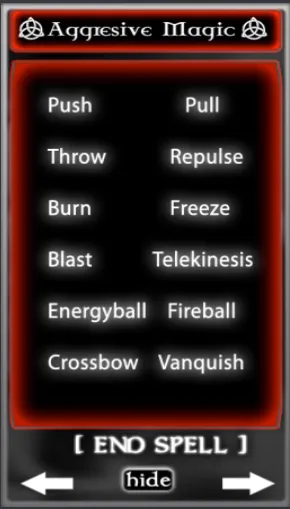
Powers of force, fire and time. Use them with care, and only on people who agree to play.
Push
A telekinetic push. You swipe your left arm, and the target flies backward.
Pull
Draws a target toward you from far away. When you walk, the target follows you.
Throw
A stronger form of telekinesis. You lift the target and throw them backward through the air.
Repulse
A burst of force pushes the avatars around you away.
Burn
The power of a firestarter. The target bursts into thick, searing flames. For roleplay only.
Freeze
Also called Temporal Stasis. The target is frozen in time. If they try to break free, the trap follows them and catches them again.
Blast
Causes an explosion 6 meters in front of you. It blows up physical objects, just as it would a person.
Telekinesis
With a wave of your hand, you move others with your mind. The target levitates and floats beside you. Click and drag them to move them around in mid-air.
Energyball
You summon a ball of electric energy in your hand and hurl it at your enemy. Works with Kill Zone.
Fireball
A fireball forms in your palm. Throw it at a target to kill them or push them several meters back. Works with Kill Zone.
Crossbow
You conjure a Darklighter crossbow. Its poisoned arrows can kill a target instantly. Works with Kill Zone.
Vanquish
The strongest single power in the book. You raise your hands and blast the target into the sky, and the power does not let go. Vanquish also works on land where pushing is turned off.
Vanquish is not a toy
Because Vanquish works even on no-push land, it can be used to harass people. Griefing breaks the Second Life Terms of Service. Use it only with willing players.
Kill Zone
Energyball, Fireball and Crossbow work with the Kill Zone combat system.
Supportive Magic
Powers that protect, guide and help you.
Potion
A smokescreen potion. Throw it and a cloud of smoke rises. Perfect for an escape or a distraction.
Astral Projection
You send out your conscious mind. You can hear the conversations of others, wherever your sight goes.
After you cast it, hold Alt and zoom your camera to any place. You hear the local chat there.
Portal
Opens a pair of connected portals you can travel through. See How to use Portal below.
Telepathy
You open your mind to the thoughts of others. You can see commands that people type on hidden chat channels.
Click Telepathy again to close your mind.
Platform
Summons a detailed witch's platform, where you can work your magic in peace.
Conjuring
A half-Whitelighter power. Summon any item you like, as if by magic. You can add your own items to the HUD. See How to use Conjuring below.
Shield
A shield that protects you from evil. It defends you against projectiles and physical attacks.
Empathic Sense
You sense everyone who is close to you. Their names and distances appear in your local chat.
Scrying
The way witches track someone down. A charmed pointer appears and points you toward your target.
How to use Portal
- Click Portal. The first portal opens in front of you.
- Click Portal again. The second portal opens in front of you, and the two connect.
- Move each portal to any place in the region.
- Click a connected portal. You travel through it and step out of the other one.
Place one portal at home and one somewhere far away in the same region. You now have your own shortcut.
How to use Conjuring
Click Conjuring to open its menu. It has three choices:
- Add: store a new item of your own in the HUD.
- Delete: remove an item you stored.
- Conjure: summon one of your stored items, magically, in front of you.
Spells
Spells are found on the Spells page of the HUD.
Conceal Person
You cast the "Object of Objection" spell. The target shimmers beautifully out of sight.
The target gets a request to allow animations. They must click Yes within 8 seconds, or the spell fails.
Reveal Person
The reverse of Conceal Person. It reveals a person who was hidden by magic.
Like Conceal Person, the target must click Yes within 8 seconds.
Snow
A simple charm. A light blizzard falls over the area.
Witch's Pentacle
A magic witch's circle. Meditate inside it, safe from the outside world.
Book of Shadows
Conjures a decorative Book of Shadows for display. Click it to interact with it. The HUD button is called Call: Book of Shadows.
This book has secrets
The conjured Book of Shadows is more than decoration. Click it and read its chapters to find the hidden powers and the Crystal Cage. See Hidden Chapters.
Light
Lights up the area around you. Useful at night or in dark places. To turn the light off, click End Spell.
Flight
An innate power. You fly to any height, and your flight speed is boosted.
Flight works by itself. Fly higher than 72 m, and at least 36 m above the ground. The book then holds you in the air and speeds up your climb when you fly up.
Cast from chat
You can also cast from local chat on channel /3. Only you, the owner, can use it. For example:
/3 push/3 freeze/3 empathy/3 spell_lightThe command names are: push, pull, throw, repulse, burn, freeze, blast, telekinesis, energyball, fireball, crossbow, vanquish, smoke (Potion), astral, portal, telepathy, platform, shield, empathy, scry, spell_conceal, spell_reveal, spell_snow, spell_pentacle, spell_bos (Book of Shadows) and spell_light. The orbing commands are on the Orbing page.
Teleportation
Orbing has its own page in the HUD and its own page in this manual. Learn to orb.